You’ve probably heard someone mention “Core Web Vitals” in passing – maybe during a site audit, or in a Google email about your website performance.
Here’s the reality: Core Web Vitals matter, but not the way most people think.
Google says they affect rankings. That’s technically true. But the impact is smaller than most agencies claim. A site with poor Core Web Vitals can still rank well if the content is good enough. And a site with perfect Core Web Vitals will never rank if nobody wants to read it.
Let me break down what Core Web Vitals actually measure, why Google cares, and what you should actually prioritize if you’re trying to improve your search rankings.
What Are Core Web Vitals? The Three Metrics
Core Web Vitals are three specific measurements Google uses to gauge how your website feels to visitors. They measure speed, interactivity, and visual stability.
1. Largest Contentful Paint (LCP) – How Fast Your Page Loads
What it measures: How long until the biggest visible element on your page loads.
Think of it like this: when someone lands on your homepage, the main image, headline, or content block takes time to appear. LCP measures that time.
Target: Under 2.5 seconds
Example: Your homepage loads in 1.2 seconds = good LCP. Someone clicks on a blog post and waits 4 seconds for the article text to appear = bad LCP.
Why it matters: If your page takes 4+ seconds to load, people bounce. Google knows this, so they favor faster pages.
2. First Input Delay (FID) – How Responsive Your Page Is
What it measures: How long between when someone clicks/types and when the page responds.
Imagine you land on a contact form. You click the “Name” field, but nothing happens for 300 milliseconds. That delay is FID.
Target: Under 100 milliseconds
Why it matters: Laggy pages feel broken. If your page doesn’t respond instantly when someone tries to interact with it, they’ll leave.
Note: Google is phasing out FID in favor of Interaction to Next Paint (INP) in 2024, which measures responsiveness more comprehensively. But FID still matters for now.
3. Cumulative Layout Shift (CLS) – Visual Stability
What it measures: How much the page layout shifts around while you’re trying to use it.
Picture this: You’re reading an article. Halfway through, an ad loads and pushes all the text down. You lose your place. That unexpected movement is CLS.
Target: Under 0.1
Why it matters: Pages that jump around feel cheap and broken. Visitors get frustrated and leave.
Do Core Web Vitals Actually Affect Your Rankings?
Short answer: Yes, but it’s a small factor.
Google has publicly stated that Core Web Vitals are a ranking factor. But here’s what they didn’t say clearly: they’re a minor ranking factor compared to content quality and relevance.
In real terms:
- A page with mediocre content but perfect Core Web Vitals will not outrank a page with excellent content and poor Core Web Vitals.
- A page with great content and poor Core Web Vitals might still rank well – it just won’t beat another page with great content and good Core Web Vitals.
The hierarchy looks like this:
- Content quality & relevance (50-60% of ranking weight)
- Links & authority (20-30%)
- Technical SEO (including Core Web Vitals) (10-20%)
Core Web Vitals are part of that technical SEO bucket, but they’re not the whole bucket. Other technical factors matter too: crawlability, indexation, structured data, mobile-friendliness.
Bottom line: Fix Core Web Vitals if they’re broken. But don’t obsess over them at the expense of creating better content.
How to Check Your Core Web Vitals
You have three main ways to see your data:
1. Google Search Console (Best for Your Site)
This is the official source. Go to Search Console → Experience → Core Web Vitals.
Google shows you:
- Which pages are performing well
- Which pages need improvement
- Whether you’re passing or failing the assessment
This data is based on real user experience from your actual visitors – not simulated tests.
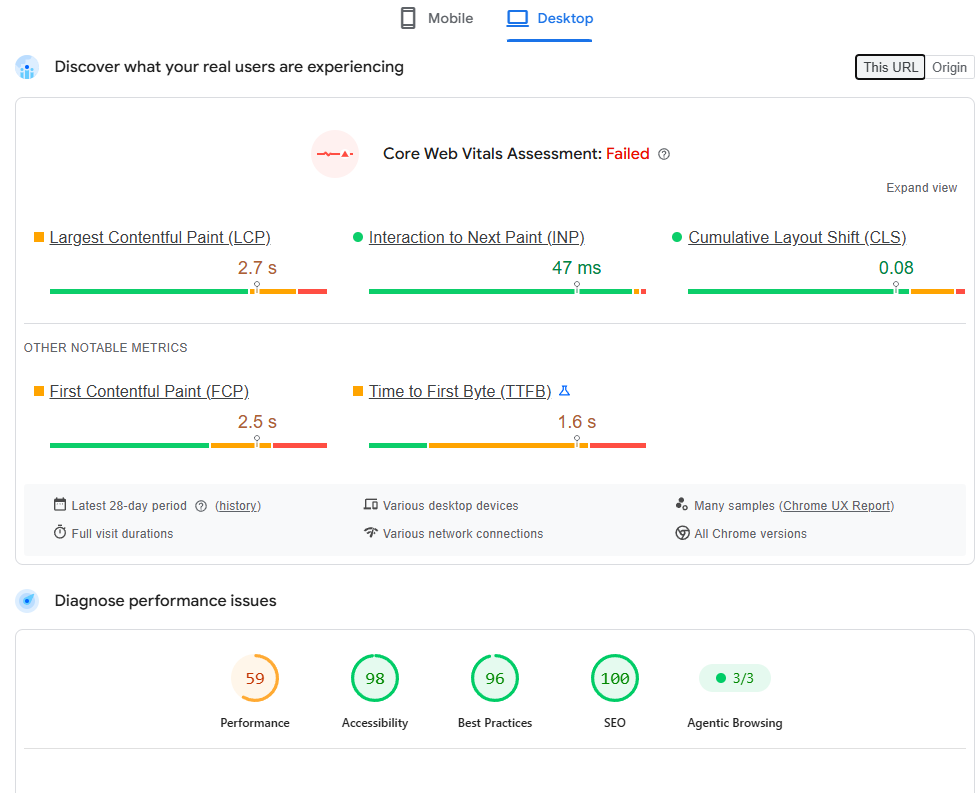
2. Google PageSpeed Insights (Best for Quick Checks)
Go to pagespeedinsights.web.dev, paste in your URL, and hit Enter.
You’ll see:
- Your Core Web Vitals scores
- Lab data (simulated performance)
- Suggestions for improvement
Important caveat: Lab data is simulated on a standard device with a standard connection. Your real users might have different experiences depending on their devices and internet speed.
3. Lighthouse (Built Into Chrome DevTools)
Open Chrome Developer Tools (right-click → Inspect), go to the Lighthouse tab, and run an audit.
This gives you detailed recommendations for each Core Web Vital, plus tips for fixing them.
What Your Scores Actually Mean
Google rates your Core Web Vitals as:
- Green (Good): 0-50ms (FID), 0-2.5s (LCP), 0-0.1 (CLS)
- Yellow (Needs Improvement): 51-100ms (FID), 2.6-4s (LCP), 0.11-0.25 (CLS)
- Red (Poor): 101ms+ (FID), 4+ seconds (LCP), 0.26+ (CLS)
Where do you stand right now?
If you check your Core Web Vitals in Search Console and see:
- All green = You’re in good shape, focus on content
- Some yellow = Fix the biggest offender first (usually LCP)
- Any red = This needs attention before you publish more content
How to Improve Core Web Vitals (Without Becoming a Developer)
You don’t need to code to fix these. Here’s what actually moves the needle:
For LCP (Slow Page Loading):
1. Optimize images. Large images are the #1 culprit.
- Compress images before uploading (use TinyPNG.com or similar)
- Use WebP format instead of JPG/PNG (smaller file size, same quality)
- Set image dimensions so the browser doesn’t have to guess
2. Use a caching plugin.
- Install WP Super Cache or W3 Total Cache
- This stores a “snapshot” of your page so it loads faster for repeat visitors
3. Minimize scripts.
- Remove plugins you don’t use
- Disable heavy analytics scripts (or load them after the page renders)
- Use your hosting provider’s CDN (content delivery network) to serve files faster
4. Upgrade your hosting if needed.
- If your server is slow, no amount of optimization will help
- Shared hosting is usually fine for small businesses, but if your site is getting 10K+ monthly visitors, cloud hosting will help
For FID/INP (Unresponsive Pages):
1. Reduce JavaScript.
- JavaScript is what makes pages laggy
- Audit plugins – some add unnecessary scripts to every page
- Load non-critical scripts after the page loads
2. Defer non-critical CSS and JavaScript.
- This tells the browser to load essential content first, then load extra stuff later
- Most caching plugins handle this automatically
For CLS (Layout Shifting):
1. Set fixed dimensions for images and video.
- Tell the browser “this image is 600x400px” so it reserves space before the image loads
2. Avoid inserting content at the top of the page.
- Don’t load ads or notifications above your main content
3. Use web fonts carefully.
- If a web font takes too long to load, use a system font as a backup so text doesn’t shift when the font arrives
The 80/20 Move: Fix LCP First
If your Core Web Vitals are all over the place, focus on LCP first.
Slow page load is the biggest user frustration, and it’s usually the easiest to fix. Often it’s just one or two large images dragging everything down.
Quick 30-minute audit:
- Go to PageSpeed Insights and check your score
- Look at the “Opportunities” section
- Start with “Eliminate render-blocking resources” or “Defer unused CSS”
- Install a caching plugin if you don’t have one
Usually that gets you from red/yellow to green on LCP.
When NOT to Obsess Over Core Web Vitals
Core Web Vitals matter, but they’re not everything. Don’t sacrifice these for the sake of perfect Core Web Vitals:
Don’t remove legitimate analytics tools. If you need to track conversions, Google Analytics is more important than a 50ms improvement in FID.
Don’t delete plugins that provide real value. If a plugin helps you capture leads or manage your business, keep it. Core Web Vitals are secondary.
Don’t ignore content for months while perfecting speed. A slow page with great content will eventually outrank a fast page with mediocre content.
Don’t hire a developer to “optimize Core Web Vitals” if your site is already green. You’re paying for diminishing returns.
The Real SEO Priority Order
If you’re trying to improve your search rankings, focus on this order:
- Great content that answers what people are searching for (6 months of effort)
- Sound technical foundation – site loads, no errors, mobile-friendly (1-2 weeks)
- Core Web Vitals – fast, responsive, stable (1-2 weeks)
- Backlinks & authority – getting other sites to link to you (ongoing)
Get #1 and #2 right, and Core Web Vitals usually follow naturally.
Is Your Site Ready for SEO?
Before you invest in content and link building, run a quick site health check:
- [ ] Site loads in under 4 seconds (check PageSpeed Insights)
- [ ] Site is mobile-responsive (test on a phone)
- [ ] No broken links (Google Search Console → Coverage)
- [ ] No security warnings (HTTPS, not HTTP)
- [ ] Google can crawl your pages (Search Console → Coverage report)
If all of those are green, your technical foundation is solid. Now you can focus on content and SEO strategy without worrying about Core Web Vitals holding you back.
Ready to Build Your Technical SEO Foundation?
If your site’s speed or responsiveness is holding you back, we help service businesses audit their site, identify what’s actually broken, and fix the biggest bottlenecks – usually in 2-4 weeks.
Check out our page speed optimization services →
Or if you want to see exactly where your site stands: Get your free website audit →
We’ll tell you which Core Web Vitals are problematic, which ones can wait, and what will actually move the needle for your rankings.
Key Takeaways
- Core Web Vitals are real, but they’re a small ranking factor. Content and links still matter more.
- You need all three signals to be green. LCP (speed), FID (responsiveness), CLS (stability).
- Check your scores in Google Search Console, not just PageSpeed Insights. Real user data matters more than simulated tests.
- Focus on LCP first. Image optimization and caching plugins solve 80% of speed issues.
- Don’t sacrifice real functionality for perfect Core Web Vitals. A slow site with great content beats a fast site with mediocre content.
- Get your technical foundation right, then focus on content. That’s the winning sequence.